Lead Priority Matrix
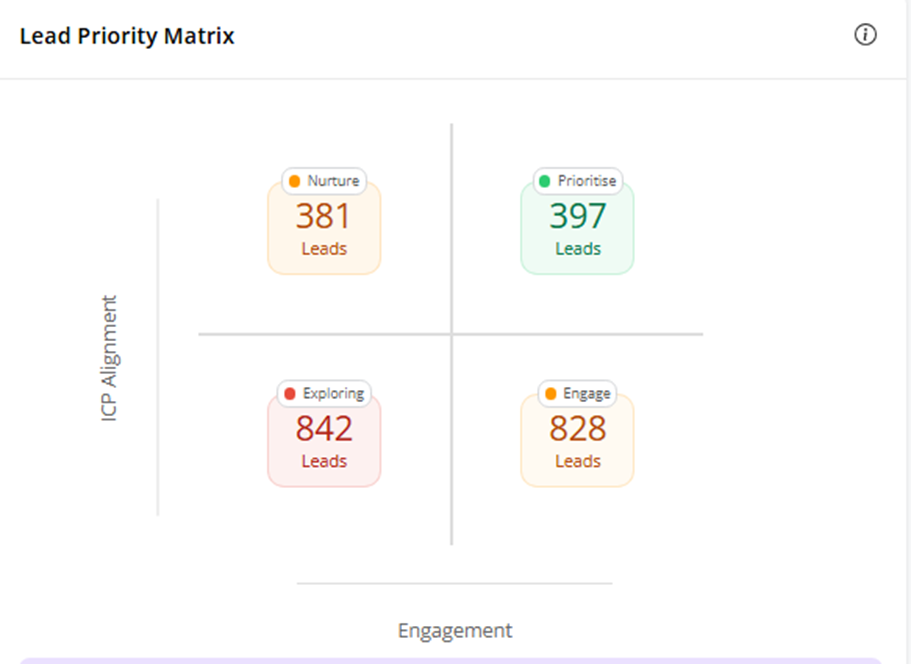
The Lead Priority Matrix is a visual tool designed to help teams quickly assess and prioritize leads based on two key factors:
- ICP (Ideal Customer Profile) Alignment
- Lead Engagement Level
The matrix is divided into four distinct quadrants to categorize leads effectively:
- Hot Leads (Prioritize Leads) – These leads show both high engagement and a strong match with your ideal customer profile. They represent the highest conversion potential and should be prioritized for sales outreach.
- Warm Leads (Nurtured Leads)– These leads are a good fit for your product or service but currently show lower engagement. They are ideal for nurturing campaigns aimed at increasing interest.
- Curious Leads (Engaged Leads) – Highly engaged but with a lower ICP match, these leads may be exploring your offering for adjacent use cases or out of general interest. They require a tailored evaluation to determine true potential.
- Entry Leads (Exploring Leads) – Leads in this quadrant have both low engagement and low alignment with your ICP. They are lowest in priority but may still be worth including in long-term or broad marketing efforts.
This matrix enables sales and marketing teams to align efforts, focus on the right segments, and improve overall lead conversion strategy by making qualification transparent and actionable.
Ideal Customer Profile
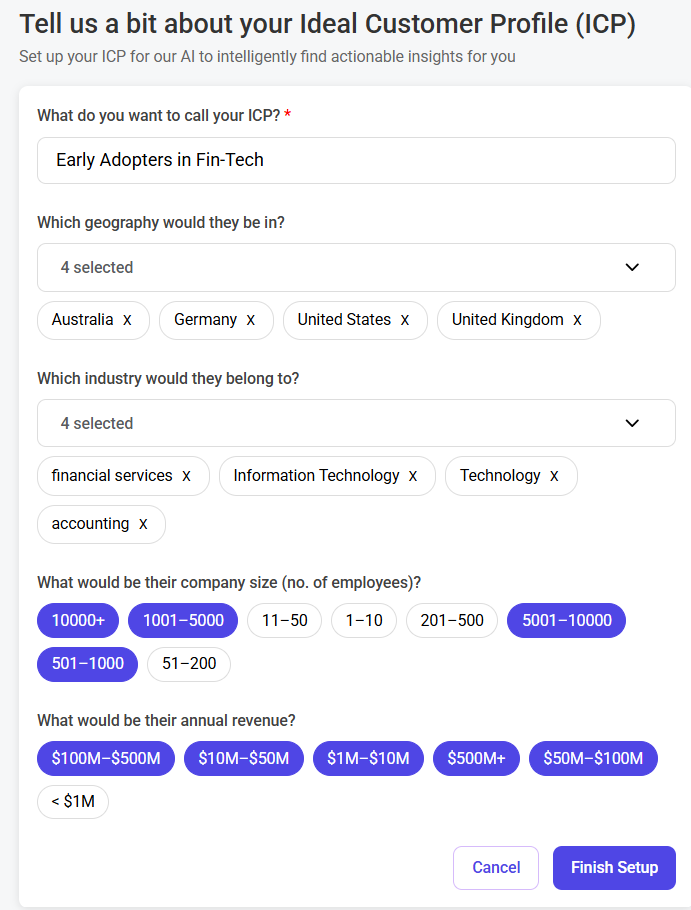
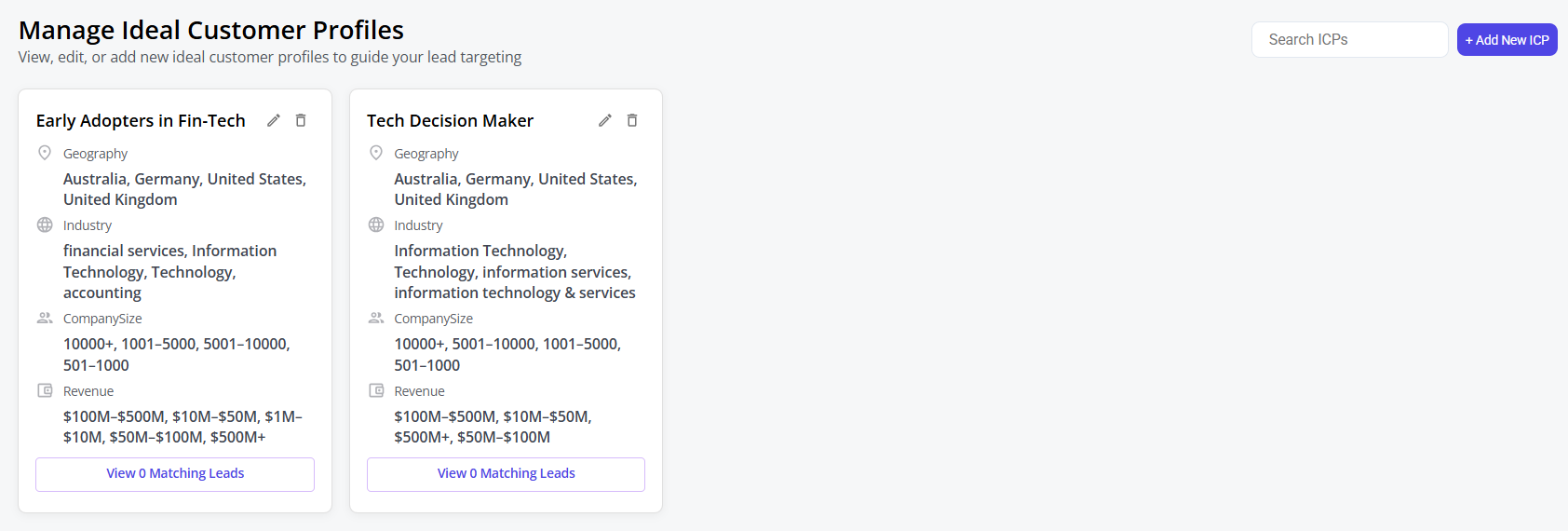
The Ideal Customer Profile (ICP) represents the set of characteristics that define a high-value lead using the platform. During the onboarding process, users are prompted to define their ICP by selecting key qualification parameters. This ensures that the lead prioritization logic is tailored to each user’s unique business goals.
Currently, the platform supports the following core ICP parameters:
- Geography – Target location or region of interest
- Industry – Preferred sectors or verticals
- Employee Size – Company size based on headcount
- Revenue – Annual revenue range
These parameters form the basis for scoring each incoming lead’s alignment with the defined ICP. Leads that closely match the defined criteria receive a higher ICP alignment score and are positioned accordingly in the Lead Priority Matrix.
In subsequent versions, the platform will support additional advanced parameters, such as:
- Job Title
- Topic Interested etc.
This flexible ICP framework allows to maintain control over what qualifies as a “good fit” lead, making lead qualification both personalized and scalable.
Engagement Score
The Engagement Score is a dynamic metric that quantifies the depth and quality of a lead's interactions across various touchpoints during a campaign.
All interaction scores are accumulated, they are normalized using a statistical distribution model (e.g., normal distribution) to ensure consistent scoring across diverse lead behaviour patterns. This results in a single, unified engagement score for each lead, which is then mapped to a qualitative bucket.
This approach helps exhibitors and sponsors focus on leads who demonstrate the highest interest and buying intent, while also identifying those who may benefit from additional nurturing.
Topic Lens
Summary:
Topic Lens provides a unified view of lead engagement across all media interactions—by categorizing and visualizing interest by content theme.
What It Does:
It aggregates lead activities across integrated channels and presents a clear bar chart showing how many leads have engaged with each topic. This helps identify which themes are driving the most attention across your campaigns.
Why It Matters:
By revealing topic-level interest patterns, Topic Lens enables campaigns to align their messaging, content, and outreach with what their audience actually cares about—driving better engagement and conversion outcomes.
Primary Benefits:
- Understand audience interests at a glance
- Prioritize follow-ups based on topic engagement
- Inform content and sponsorship strategy with real-time insights
- Save time with a clear, actionable visual summary
Geography - Global Lead Distribution Map
Summary:
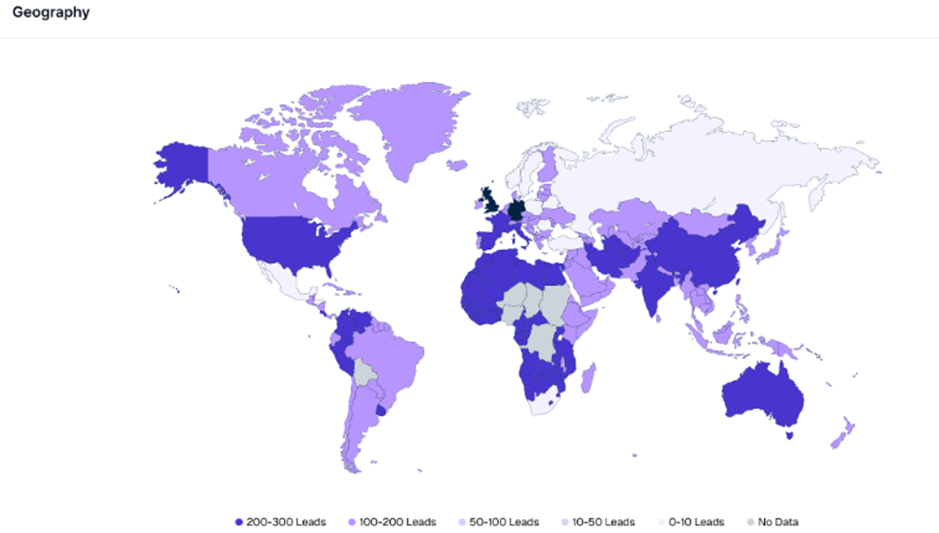
The Geography view presents a global heatmap of lead distribution, highlighting where leads are coming from across all tracked campaigns. Countries are color-coded based on the volume of leads generated, enabling users to compare regional engagement at a glance visually.
What It Does:
This feature aggregates lead data by country and displays it using a color-coded intensity scale. The darker the shade, the higher the number of leads from that region, with categories ranging from 0–10 leads to 200–300 leads. Countries with no data are shown in grey. This geographic breakdown allows for instant visual benchmarking of market penetration and regional campaign effectiveness.
Why It Matters:
To maximize ROI across global or regional campaigns, understanding where leads are concentrated geographically is essential. This view helps identify high-performing territories, reveal under-engaged regions, and guide decisions about targeting, localization, and resource allocation.
Primary Benefits:
- Visualize lead density across countries in real-time
- Identify geographic regions with strong engagement for targeted follow-up
- Spot underperforming markets for strategic review or re-engagement
- Support regional sales and marketing strategies with data-backed insights
- Inform decisions about local events, language-specific content, or in-market representation
In Subsequent version, the geography map shows the state (in a country) vs Country (in the world) map based on the lead distribution to support regional vs global events.
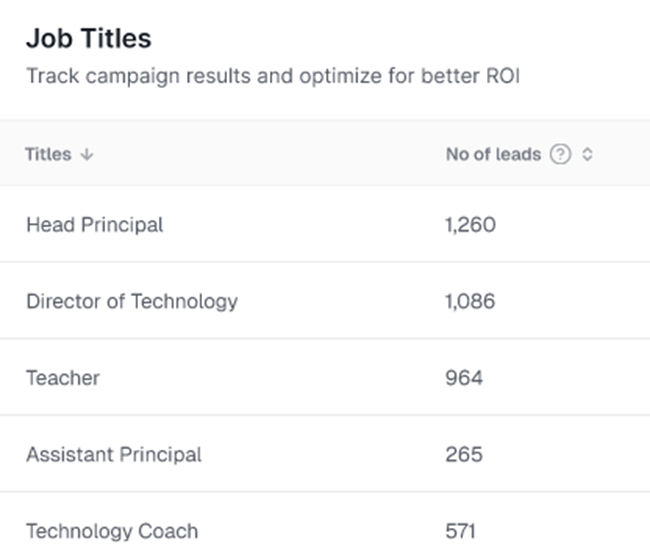
Job Titles – Lead Breakdown by Role
Summary:
The Job Titles view highlights how many leads were captured from specific professional roles across all campaigns, enabling users to assess which personas are engaging most with their content and outreach efforts.
What It Does:
This table lists job titles alongside the number of leads associated with each role. Titles like “Head Principal,” “Director of Technology,” and “Teacher” are ranked by lead volume, providing a clear picture of which roles are showing the most interest or engagement across marketing and event activities.
Why It Matters:
Understanding lead distribution by job title helps tailor messaging, prioritize follow-up, and align campaign strategies with the decision-makers or influencers most responsive to their offerings.
Primary Benefits:
- Identify which professional roles are most engaged across campaigns.
- Personalize outreach and content to resonate with top-performing job titles.
- Align future campaign targeting with actual role-based engagement data.
- Improve sales efficiency by focusing on high-value personas.
- Support persona-based marketing strategies with real-time insights.
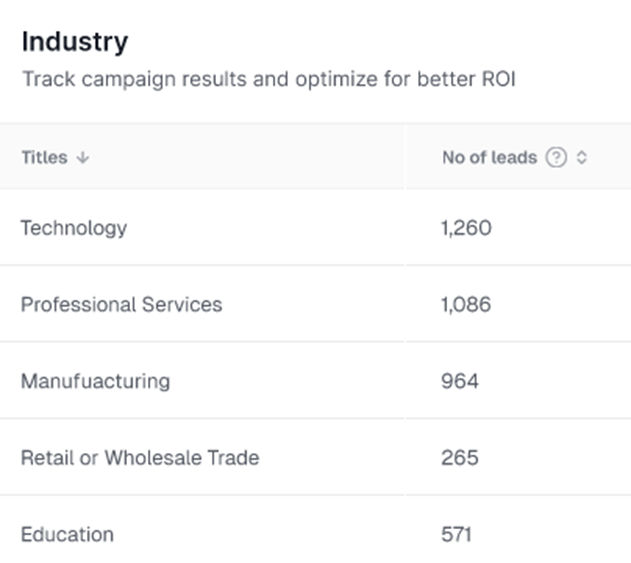
Industry – Lead Breakdown by Sector
Summary:
The Industry view provides a categorized breakdown of lead volume by business sector, allowing users to understand which industries are most responsive to their campaigns.
What It Does:
This table displays industries such as “Technology,” “Professional Services,” and “Manufacturing,” along with the number of leads generated from each. It helps marketing and sales teams identify where their campaigns are gaining the most traction from an industry standpoint.
Why It Matters:
Knowing which industries engage most with your campaigns enables more strategic planning—whether for content development, sales prioritization or media sponsorships. It helps teams focus efforts on sectors showing the highest interest and potential ROI.
Primary Benefits:
- Discover which industries generate the most leads.
- Align campaign messaging and positioning with high-engagement sectors.
- Guide sales and partnership strategies based on industry traction.
- Identify underrepresented industries that may require re-engagement.
- Enhance targeting in future campaigns with industry-specific insights.
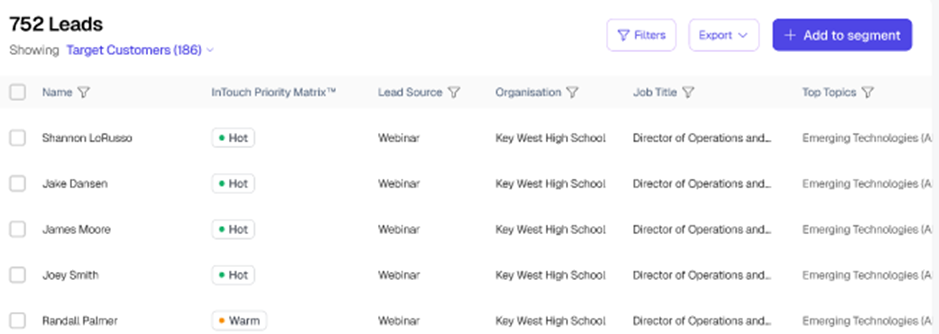
Lead Listing Table
Summary:
The Lead Listing Table is a centralized, interactive workspace that gives users full visibility and control over all leads captured through event campaigns. It displays detailed, actionable information for each lead and supports advanced filtering, segmentation, and prioritization based on engagement, profile, and campaign activity.
Feature Overview:
This feature presents a structured table of leads enriched with key details such as engagement priority, lead source, organizational affiliation, professional role, and content preferences. The interface is built for high usability—allowing users to search, sort, filter, export, and group leads into segments for downstream marketing or sales workflows.
Each lead is automatically assigned an engagement status using the Priority Matrix™—with intuitive tags like Hot, Warm, Curious, or Cold—based on behaviour and interactions across campaigns and sessions.
Supported Filtering Capabilities
Users can narrow down lead views using powerful, multi-dimensional filters across four key categories:
1. Leads Category Filters
- Geography (region or country)
- Job function or role type
- Topic of interest based on engagement behaviour
- Custom or system-defined segments
2. Accounts Category Filters
- Company employee size
- Industry classification
- Revenue range
- Ideal Customer Profile (ICP) match based on user-defined criteria
3. Campaign Category Filters
- Campaign name (event-specific)
- Sessions attended within campaigns
- Engagement level based on interaction depth
4. Channel Category Filters
- Source channel such as webinars, newsletters, or booth visits
Key Functionalities
- Advanced Filtering & Sorting: Easily locate and group leads based on engagement behaviour, firmographics, or campaign activity
- Lead Prioritization: Visual labels (Hot, Warm, Curious, Cold) help identify high-intent leads for fast follow-up
- Segmentation Workflow: Select one or more leads and assign them to custom segments for targeted campaigns
- Export Functionality: Download filtered or selected lead lists for CRM integration or sales execution
- Topic-Level Insight: Understand what themes or content each lead is most interested in, supporting hyper-personalized outreach
Why It Matters
The Lead Listing Table turns scattered lead data into a structured, actionable asset. It enables marketing and sales teams to prioritize faster, segment smarter, and personalize deeper—maximizing every opportunity generated through event and media campaigns.
Key Benefits
- Act quickly on high-priority leads using behaviour-based signals
- Run personalized outreach using interest and profile data
- Segment leads by persona, interest, or campaign performance
- Streamline marketing-to-sales handoff with filtered exports
Improve overall campaign ROI with data-informed follow-up
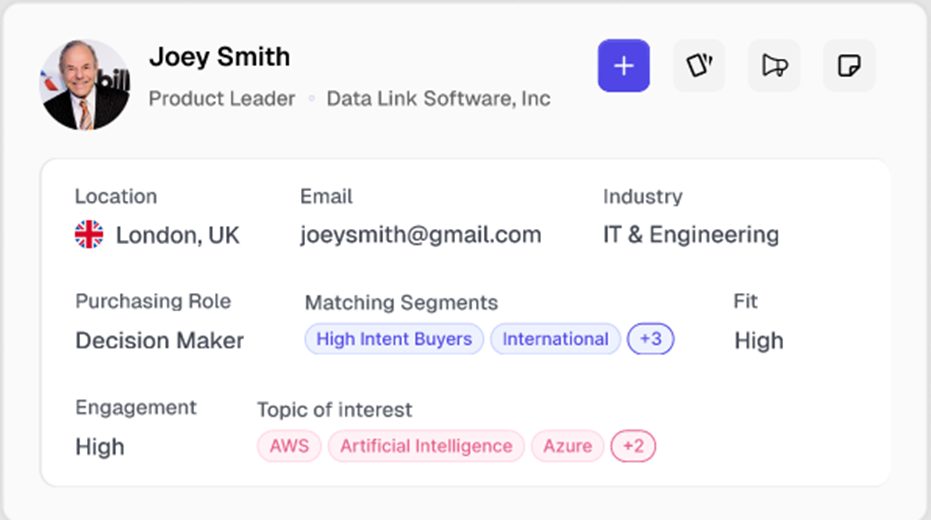
Mini Profile on Hover
Summary:
The Mini Profile on Hover feature delivers a compact, context-rich snapshot of a lead when hovering over their name or profile anywhere in the product. It enables users to instantly view key information and take quick actions without disrupting their workflow.
Feature Overview
When a user hovers over a lead’s name or avatar, a mini profile card appears, displaying high-value attributes in a clean and structured format. This includes the lead’s name, job role, company, location, email, industry, purchasing role, engagement level, fit score, and matching segments. It also highlights the lead’s top topics of interest based on behavioural engagement.
In addition to viewing data, users can take immediate actions such as adding the lead to a segment, initiating communication, or exporting. Clicking anywhere on the mini profile card opens the full Lead Profile Page, where users can explore detailed history, engagement timeline, campaign participation, and additional insights for deeper analysis and personalized follow-up.
Why It Matters
The ability to preview and act on lead data without leaving the current view saves time and reduces friction. When deeper context is needed, one-click access to the Lead Profile Page ensures a smooth transition to a more detailed view—supporting both quick actions and in-depth lead management.
Key Benefits
- Increase Efficiency: Instantly access essential lead attributes in a compact view.
- Faster Decisions: Evaluate lead quality quickly using behavioural and firmographic signals.
- Smarter Engagement: Personalize interactions with insights into intent and relevance.
- Streamlined Navigation: One-click access to the full Lead Profile Page for deeper exploration.
- Unified Workflow: Act on leads with minimal disruption across any part of the platform.
Lead Profile Page
Summary:
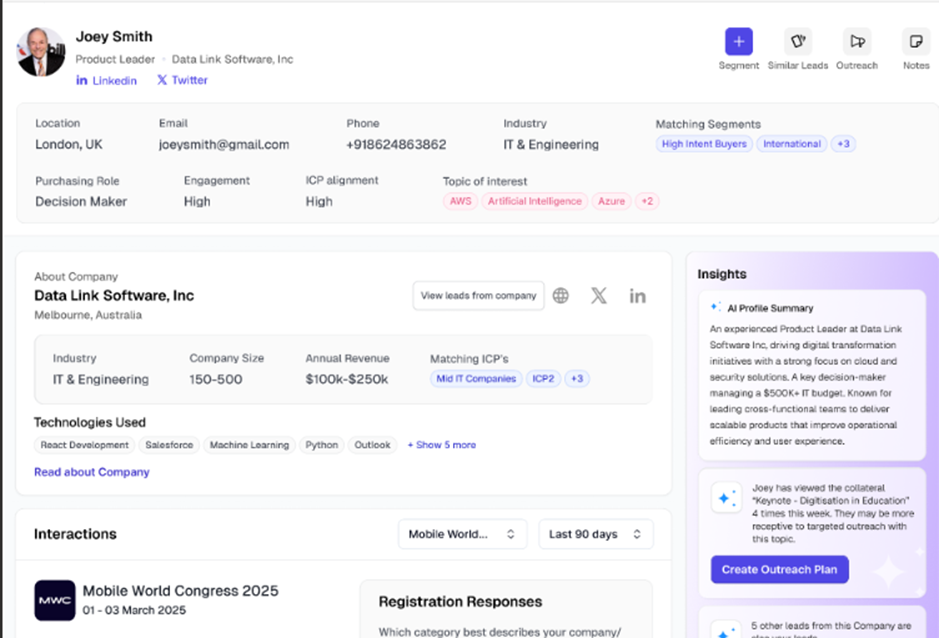
The Lead Profile Page offers a complete, 360-degree view of an individual lead—consolidating demographic, firmographic, behavioural, and engagement data into a single actionable workspace. Designed for efficiency and insight, it enables sales and marketing teams to qualify, engage, and act on leads with precision and speed.\
Feature Overview:
This page serves as the single source of truth for every lead captured across campaigns and channels. It includes:
- Lead Identity and Contact Details
Displays full name, job title, company, location, email, phone number, and industry, providing clear visibility into who the lead is and how to reach them. - Intent and Fit Indicators
Signals such as engagement level, ICP alignment, purchasing role (e.g., Decision Maker), and matching segments help users instantly assess the lead’s relevance and readiness. - Topics of Interest
Behaviour-derived tags (e.g., “AWS,” “Artificial Intelligence,” “Azure”) reflect the lead’s content consumption trends and thematic preferences—ideal for message personalization. - Company Overview
Shows key details about the lead’s organization, including industry, size, revenue range, ICP alignment categories, and technologies used—enabling quick B2B context evaluation. - Interaction Timeline
Feed of Campaign interactions. Users can filter by Campaign or Date Range to view recent or specific activities. - Registration Responses
Captures form responses during registrations providing additional insights that can guide follow-up.
Action Panel – Lead-Level Quick Actions
Positioned at the top-right of the profile page, the action panel allows users to immediately act on a lead using the following tools:
- Add to Segment
Assign the lead to a targeted segment for ongoing campaigns, nurture flows, or audience reporting. Segmentation can be based on behaviour, profile data, or fit score. - Similar Leads
Surface other leads that match this profile across dimensions such as industry, role, company size, or interests—helping expand outreach to lookalike audiences. - Create Outreach Message
Draft a personalized message leveraging the lead’s attributes, engagement behaviour, and content interests. This can initiate outbound efforts directly from within the product or integrate into a broader campaign tool. - Add Notes
Attach private or team-visible notes to the lead's profile to document insights, meeting summaries, follow-up tasks, or qualification flags—ensuring context is preserved across handoffs.
Why It Matters
The Lead Profile Page transforms raw lead data into an actionable command centre. It equips users with everything they need to understand, prioritize, and engage a lead—without switching tools or losing context. Combined with instant-action buttons, it bridges the gap between insight and execution, helping teams move faster and smarter.
Key Benefits
- Unifies all lead data in one place for faster decision-making.
- Highlights fit, role, and intent to drive qualification and prioritization.
- Supports hyper-personalized outreach using behavioural and firmographic context.
- Enables immediate segmentation, messaging, and collaboration through built-in actions.
- Reduces friction across marketing-to-sales handoff and campaign follow-through.
Was this article helpful?
That’s Great!
Thank you for your feedback
Sorry! We couldn't be helpful
Thank you for your feedback
Feedback sent
We appreciate your effort and will try to fix the article